

Remote Controls

Pay in 3 interest-free payments on purchases from £20-£3000 with  . Learn more.
 Loading...
End of content
Error - No more pages to load
About Remote Controls
Remote controls for professional tools have revolutionised the way tradespeople operate laser levels, rotation lasers, and precision measuring equipment on site. These wireless control units enable operators to adjust settings, activate functions, and control equipment from a distance of up to 30 metres or more, eliminating the need to repeatedly return to the device during layout and levelling work. This capability proves particularly valuable when working across large construction sites, on scaffolding, or in situations where the tool is positioned in difficult-to-reach locations such as ceiling height or across multiple rooms.
The remote controls available from Tooled-Up.com are manufactured by Bosch Professional, designed specifically to withstand the rigours of construction site environments. These units feature robust housings that protect against dust, moisture, and impact whilst providing reliable wireless connectivity over impressive distances. For rotation lasers and floor laser levels, a dedicated remote control transforms operations that would otherwise require constant repositioning or a second worker, saving both time and labour costs on every job. Modern tool remote controls utilise advanced radio frequency technology to maintain stable connections even in challenging conditions with potential interference from other electronic equipment, ensuring tradespeople can work efficiently without interruption.
The intuitive button layouts on professional remote controls mirror the functions on the main device, ensuring operators can quickly familiarise themselves with the remote's operation without consulting manuals or interrupting workflow. Battery-powered operation typically uses readily available AA batteries, with some models featuring battery life indicators to prevent unexpected disconnection during critical work. Whether you're a groundworker setting precise levels for foundations, a floor fitter establishing accurate screeding heights, or a ceiling installer maintaining consistent levels across commercial spaces, a quality remote control is an essential productivity tool.
Jargon Buster
- RF (Radio Frequency): A wireless transmission method that doesn't require line-of-sight between the remote and the tool, allowing operation even when obstacles such as walls or partitions are present. RF remotes typically offer greater range and reliability than infrared alternatives in construction environments.
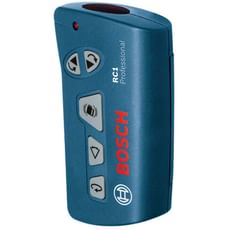
- Operating Range: The maximum distance at which the remote control can reliably communicate with the connected tool, typically measured in metres. Professional models like the Bosch RC 1 offer ranges of 30 metres, sufficient for most commercial and residential applications.
- Pairing/Synchronisation: The process of establishing a secure wireless connection between the remote control and the specific tool it will operate, preventing interference from other nearby devices on busy construction sites where multiple laser systems may be in use.
- Rotation Laser: A self-levelling laser that spins a laser beam 360 degrees to create a level reference line around an entire room or site area. Remote controls allow operators to adjust rotation speed, activate alignment functions, and switch between horizontal and vertical modes from a distance.
- Multi-Function Controls: Remote units that can adjust various parameters such as rotation speed, self-levelling functions, line visibility, slope settings, and alignment without requiring physical access to the main device, maximising efficiency on site.
- Vertical Mode Alignment: A function available on advanced remotes that allows precise adjustment of the laser line when the rotation laser is positioned vertically, essential for plumb line applications and wall installations.
Who Uses Remote Controls?
Remote controls for professional laser levels and rotation lasers are essential equipment for various trades and applications:
- Construction Site Managers: Overseeing large-scale levelling and layout operations across extensive build areas where constant repositioning would waste valuable time
- Groundworkers and Civil Engineers: Setting precise levels for foundations, drainage systems, and landscaping projects across expansive outdoor sites
- Floor Fitters and Screeding Specialists: Establishing accurate floor levels and gradients without constant repositioning, particularly crucial for large commercial installations
- Builders and General Contractors: Managing multiple layout tasks efficiently on residential and commercial projects where the laser may be positioned centrally whilst work proceeds around the perimeter
- Shop Fitters and Joiners: Installing fixtures, fittings, and shelving systems with precision across retail and commercial spaces
- Ceiling and Partition Installers: Setting consistent heights and levels whilst working at various positions around large rooms or open-plan offices
- Tilers and Stone Masons: Maintaining precise gradients and levels during large-area installations where the laser reference point may be positioned away from the working area
- Serious DIY Enthusiasts: Undertaking substantial home renovation projects requiring professional-grade accuracy, particularly extensions and conversions
How to Choose the Right Remote Controls
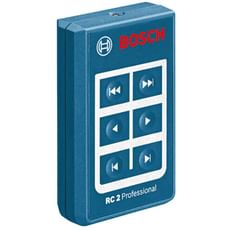
Selecting the appropriate remote control for your laser equipment depends on several crucial factors. First and foremost, ensure compatibility with your existing equipment – remote controls are specifically designed for particular tool models or ranges. The Bosch RC 1 Remote Control, for instance, is engineered for use with GRL rotation laser levels, whilst the Bosch RC 2 is designed for floor laser systems. Always verify compatibility before purchase by checking the manufacturer's specifications, as using incompatible equipment will result in no connection whatsoever.
Consider the operating range you require based on typical project sizes and working conditions. Domestic renovations may only need ranges of 10-15 metres, whilst large commercial sites benefit from the full 30-metre capabilities offered by professional models. Remember that obstacles, metal structures, and environmental conditions can reduce effective range, so factor in a safety margin when working in complex building layouts with multiple rooms or floors.
Evaluate the functionality offered by different remote models. Basic remotes may only start, stop, and adjust rotation speed, whilst advanced units provide comprehensive control over all device functions including slope settings, line selection, vertical mode alignment, and calibration modes. The Bosch RC 1, for example, offers full control including alignment of the laser line when the rotation laser is positioned in vertical mode, making it suitable for plumb line applications. Match the remote's capabilities to your actual requirements – unnecessary complexity adds cost without practical benefit for straightforward levelling tasks.
Ergonomics and usability matter during long working days on site. Look for intuitive button layouts with clear labelling and comfortable grip designs that won't cause fatigue during extended use. If you work in cold conditions or regularly wear work gloves, ensure buttons are sufficiently large and responsive for easy operation. Battery accessibility is another practical consideration – remotes using standard AA batteries allow quick swaps without work interruption and eliminate the need for proprietary charging systems.
Finally, consider the build quality and durability required for your working environment. Construction sites demand robust housings that can withstand occasional drops, dust ingress, and moisture exposure. The build quality should match your tool investment – a professional-grade rotation laser deserves an equally resilient remote control that won't let you down in demanding conditions.
Popular Accessories
- Replacement AA Batteries: Spare alkaline or rechargeable batteries ensure uninterrupted operation when the remote's power runs low during extended site work, essential for maintaining productivity
- Protective Pouches and Cases: Dedicated storage solutions protect the remote from impacts, dust, and moisture between uses, often featuring belt clips or carabiner loops for convenient access whilst working
- Laser Detector/Receiver: Works alongside the remote control to extend the effective range of your rotation laser, particularly useful in bright outdoor conditions where laser visibility is reduced
- Tripods and Mounting Equipment: Essential for positioning your laser level at optimal heights and locations where remote operation provides maximum benefit, available in various heights and load capacities
- Target Plates and Reflective Panels: Improve laser visibility at distance when operating equipment via remote control, especially useful in well-lit environments or outdoors
- Laser Safety Glasses: Enhance laser line visibility in various lighting conditions whilst providing eye protection when working with Class 2 or higher laser equipment on construction sites
- Carry Cases for Laser Systems: Purpose-designed cases that accommodate the laser level, remote control, and accessories in organised compartments for efficient transport and storage
Frequently Asked Questions
What range can I expect from a professional laser level remote control?
Professional-grade remote controls available at Tooled-Up.com typically offer operating ranges of 30 metres in open conditions. The Bosch RC 1 and RC 2, for example, both provide this 30-metre range, sufficient for most construction and building applications. However, the actual range may be reduced by walls, metal structures, reinforced concrete, or electronic interference from other site equipment. For typical room sizes and most commercial site areas, this provides ample coverage for efficient one-person operation without needing to reposition the laser or walk back and forth constantly.
Will my remote control work with any laser level?
No, remote controls are designed for specific models or product ranges and are not universally compatible. The Bosch RC 1, for instance, is engineered to work with GRL rotation laser levels such as the GRL 300 HV and GRL 300 HVG Professional, whilst the Bosch RC 2 is specifically designed for floor laser systems. Always verify compatibility before purchase by checking the manufacturer's specifications or the product description. Using incompatible equipment will result in no wireless connection, rendering the remote useless. If you're unsure about compatibility, consult the product information or contact the supplier for guidance.
How do I maintain my remote control for longevity?
Remove batteries during extended storage periods to prevent corrosion of the battery contacts, which is a common cause of connection problems. Keep the unit clean and dry, storing it in a protective case or pouch when not in use to prevent dust ingress and impact damage. Avoid dropping or subjecting the remote to heavy impacts, as this can damage internal components or the wireless transmitter. If the remote becomes wet on site, remove batteries immediately and allow thorough drying in a warm environment before attempting to reuse. Regular cleaning of battery contacts with a dry cloth prevents connection issues and ensures reliable power supply.
Can I use multiple remote controls with one laser level?
This depends on the specific tool and remote model. Some professional systems allow pairing with multiple remotes for team operations where different tradespeople need control, whilst others restrict connection to a single remote at a time for security reasons. Consult your equipment manual for specific capabilities. The pairing or synchronisation process typically prevents unintended cross-control between nearby devices on busy construction sites where multiple laser systems may be operating simultaneously, ensuring your remote only controls your designated equipment.
What should I do if my remote control stops working on site?
First, check and replace the batteries – low power is the most common cause of connectivity issues and can occur suddenly when batteries near depletion. Ensure the remote is within the specified 30-metre range and has a clear transmission path to the tool, avoiding thick walls or metal obstacles where possible. Try re-pairing the remote with your device following the manufacturer's instructions, as the connection may occasionally need re-establishing. Check for physical damage to the housing, buttons, or battery compartment that might affect operation. If problems persist after these steps, contact Tooled-Up or the manufacturer for technical support or warranty assistance.